Chapter -9 (While loops)
For learn how to download and install python link here: How to download and install python in window
For learn how to run and execute the code in python link here:How to write and run the code
In this blog, the format is first I write Code then Result of that code. You can directly copy the code and so your time save in written that code. Also , image of the code and result and after which it contain explanation of the code.
Example-1.1: To convert Celsius into Fahrenheit
Code:
temp=eval(input('Enter a temperature in Celsius:'))
print('In Fahrenheit, that is', 9/5*temp+32)
Result:
Enter a temperature in Celsius: 10
In Fahrenheit, that is 50.0

Explanation:- You see this example in chapter 1.
Example-1.2: Alternative to write the example-1
Code:
temp=eval(input('Enter a temperature in Celsius:'))
if temp<-273.15:
print('That temperature is not possible.')
else:
print('In Fahrenheit, that is', 9/5*temp+32)
Result:
Enter a temperature in Celsius: 10
In Fahrenheit, that is 50.0
<When you restart the shell>
Enter a temperature in Celsius: -273.15
In Fahrenheit, that is -459.66999999999996
<When you restart the shell>
Enter a temperature in Celsius: -274
That temperature is not possible.

Explanation:- You read this in previous chapter 2.
Example-1.3: Alternative to write the example-1
Code:
temp = eval(input('Enter a temperature in Celsius: '))
while temp<-273.15:
temp = eval(input('Impossible. Enter a valid temperature: '))
print('In Fahrenheit, that is', 9/5*temp+32)
Result:
Enter a temperature in Celsius: 20
In Fahrenheit, that is 68.0
<When you restart the shell>
Enter a temperature in Celsius: -274
Impossible. Enter a valid temperature:

Explanation:- Here we use while loop that means (in Hindi: jab tak)
means this loop repeat continuously until the temperature we input is less than -273.15 , unless this loop continuously ask question.
Example-2.1: While loop use
Code:
temp = 0
while temp!=-1000:
temp = eval(input('Enter a temperature (-1000 to quit): '))
print('In Fahrenheit that is', 9/5*temp+32)
Result:
Enter a temperature (-1000 to quit): 500
In Fahrenheit that is 932.0
Enter a temperature (-1000 to quit): 1000
In Fahrenheit that is 1832.0
Enter a temperature (-1000 to quit): -1000
In Fahrenheit that is -1768.0

Explanation:- While loop means this loop continuous work until temperature is not equal to 1000.This loop continuous ask question until temperature we enter -1000
<Symbol of not equal to: =! >
Example-2.2: In previous example it not show any message when exit the shell. Now to add message here another code.
Code:
temp = 0
while temp!=-1000:
temp = eval(input('Enter a temperature (-1000 to quit): '))
if temp!=-1000:
print('In Fahrenheit that is', 9/5*temp+32)
else:
print('Bye!')
Result:
Enter a temperature (-1000 to quit): 500
In Fahrenheit that is 932.0
Enter a temperature (-1000 to quit): 1000
In Fahrenheit that is 1832.0
Enter a temperature (-1000 to quit): -1000
Bye!

Explanation:- It is similar to previous example so you easily understand it.
Example-3: Write a program and ask the user to enter number between 1 and 10 and aks the number until the user get the right answer.
Code:
from random import randint
secret_num = randint(1,10)
guess = 0
while guess != secret_num:
guess = eval(input('Guess the secret number: '))
print('You finally got it!')
Result:
Guess the secret number: 1
Guess the secret number: 2
Guess the secret number: 3
Guess the secret number: 4
Guess the secret number: 5
Guess the secret number: 6
Guess the secret number: 7
Guess the secret number: 8
Guess the secret number: 9
You finally got it!

Explanation:- You understand easily it is similar to previous chapter.
Example-4: Print the counting from 1 to 9
Code:
i=0
while i<10:
print(i)
i=i+1
Result:
1
2
3
4
5
6
7
8
9
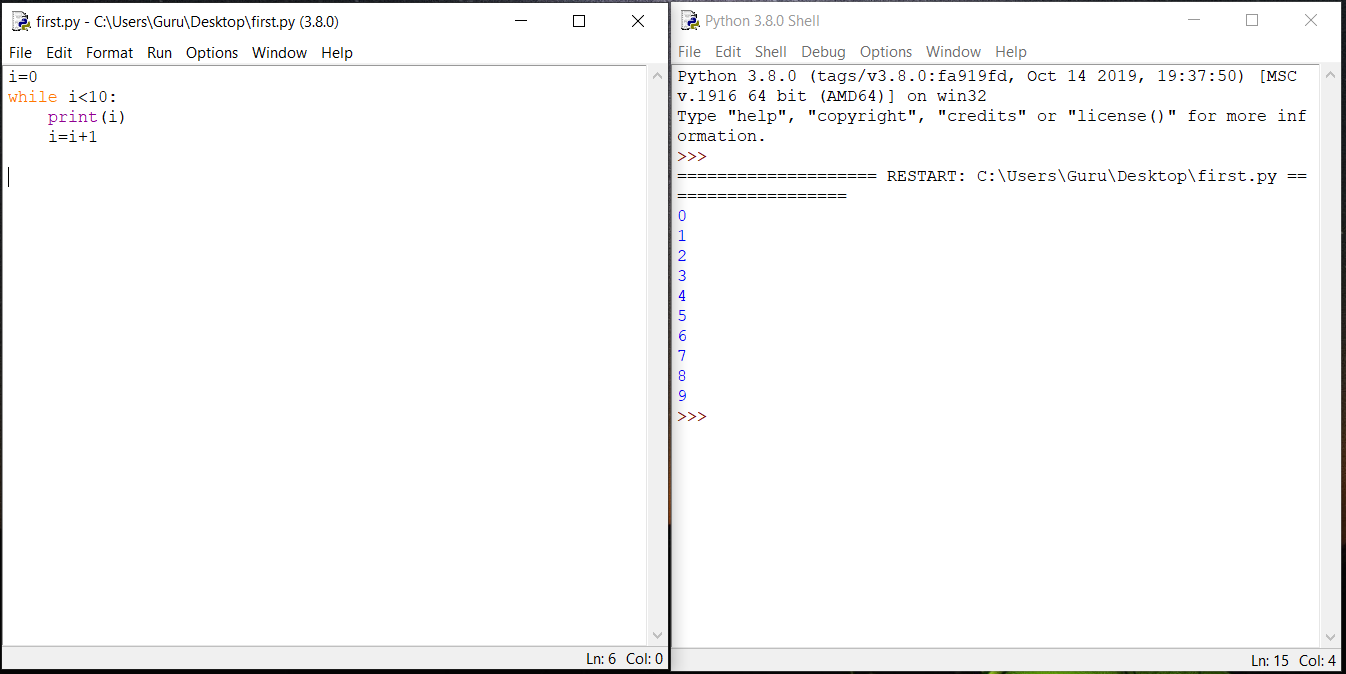
Explanation:- In 1st line use i=0 because if we not use this it show error in 2nd line where we write i<10:, Then it not able to find the 'i'
<If you want to write by using for loop>
Code:
for i in range(10):
print(i)
Example-5: Write a program and write counting by adding 2.
Code:
i=0
while i<50:
print(i)
i=i+2
print('Bye')
Result:
0
2
4
6
8
......

Explanation:- In case of use for loop use:
<Code:
for i in range(25):
print(2*i)
It give same result as the above but you know all way to write the code.>
Example-6: Print loop continuously
Code:
i=0
while i<10:
print(i)
Result:
0
0
0
0....

Explanation:- Here in 1st line, i=0 and in 2nd line i<10 is true so the loop continuous repeat. To stop use 'Ctrl+C'
Example-7.1: Program that allows the user to enter up to 10 numbers. User stop by entering a negative number.
Code:
for i in range(10):
num = eval(input('Enter number: '))
if num<0:
break
Result:
Enter number: 2
Enter number: 4
Enter number: -1 > Here exit

Explanation:- Here in 3rd line your see command if num<0: then in 4th line we write break means if it written negative number i.e., less than 0 then it exit.
Example-7.2: Program that allows the user to enter up to 10 numbers. User stop by entering a negative number.
Code:
i=0
num=1
while i<10 and num>0:
num=eval(input('Enter a number:'))
Result:
Enter a number: 5
Enter a number: 4
Enter a number: -1

Explanation:- In first line we use i=0 and in 2nd num=1, if these not use here then in 3rd line while using i and num, python show error.
<Simply understand while by its hindi meaning 'jab tak', jab tak value code ko satisfy kregi tab tak while command kam kregi otherwise exit ho jayegi>
Example-7.3: Write a program and take the input from the user if user enter a negative number then exit.
Code:
for i in range(10):
num=eval(input('Enter number:'))
if num<0:
print('Stopped early')
break
else:
print('User entered all ten values')
Result:
Enter number: 5
Enter number:4
Enter number:1
Enter number:-1
Stopped early

Explanation:- It is simple and copy of previous example, this is alternative to write the previous code.
Example-8.1: Write a program and find whether the number is prime or non prime.
Code:
num=eval(input('Enter your number:'))
for i in range(2,num)
if num%i==0:
print('Not prime')
break
else:
print('Prime')
Result:
Enter your number: 5
Prime
Enter your number:45
Not prime

Explanation:- First understand what is prime, prime number are those which are divide by itself or 1.
In 2nd line you see (2,num), here we write 2, not 1 because every number divide by 1.
In the 3rd line your see % it means remainder.
<num%i==0 means as an example if we take i.e., 5 then this shell divide the number first by 2 then 3 then 4 not 5 because in range last number not include, and as we know 5 not complete divide by 2,3,4 so this number is prime.>
Example-8.2: Write a program and find whether the number is prime or non prime.
Code:
i=2
num=eval(input('Enter your number:'))
while i<num and num%!=0:
i=i+1
if i==num:
print('Prime')
else:
print('Not prime')
Result:
Enter your number:5
Prime
<If restart the shell>
Enter your number: 45
Not prime

Explanation:- It is alternative to previous example in this we use while, and in previous example use for loop.
Example-9.1: Write a program and ask user to enter some number between 1 and 100 and if guess is right then print you got it. User got only 5 chance to guess the number.
Code:
from random import randint
num=randint(1,100)
guess=0
count=0
while guess!=num and count<=4:
guess=eval(input('Enter your guess (1-100): '))
count=count+1
if guess < num:
print('HIGHER.', 5-count, 'guesses left.\n')
elif guess> num:
print('LOWER.', 5-count, 'guesses left.\n')
else:
print('You got it!')
if guess==5 and guess!= num:
print('You lose. The correct number is', num)
Result:
Enter your guess (1-100): 15
HIGHER. 4 guesses left.
Enter your guess (1-100): 90
HIGHER. 3 guesses left.
Enter your guess (1-100):99
LOWER. 2 guesses left.
Enter your guess (1-100):50
HIGHER. 1 guesses left.
Enter your guess (1-100): 15
HIGHER. 0 guesses left.

Explanation:- In the 3rd and 4th line you see guess and count if you not use this then it show error.
In the 5 the line you see while command in which it say if guess is not equal to num and count is less than and equal to 4 ,until this process continue.
<You see 5-count means it minus 1 when you input your guess>
Example-9.2: Write a program and ask user to enter some number between 1 and 100 and if guess is right then print you got it. User got only 5 chance to guess the number.
Code:
from random import randint
num=randint(1,100)
count=0
for num in range(5):
guess=eval(input('Enter your guess (1-100):'))
count=count+1
if guess<num:
print('HIGHER.', 5-count, 'guesses left.\n')
elif guess >num:
print('LOWER', 5-count, 'guesses left.\n')
else:
print('You got it!')
break
else:
print('You lose. The correct number is', num)
Result:
Enter your guess (1-100): 50
LOWER. 4 guesses left.
Enter your guess (1-100): 10
LOWER. 3 guesses left.
Enter your guess (1-100): 50
LOWER. 2 guesses left.
Enter your guess (1-100): 70
LOWER. 1 guesses left.
Enter your guess (1-100): 30
LOWER. 0 guesses left.
You lose. The correct number is 4.

Explanation:- It is similar to previous example but it include for loop and in previous example we see while command.
Practice Question:


